
Applying for Positions in CrewAngle
- Available Positions (Events available to any crewmember who meets the position's qualifications.)
- Log into the CrewAngle Crew Portal
- Click Available Positions. You will be presented with a list of "cards" showing available positions for which you meet the qualifications. You may also search by Position, Event or Venue.
-
Under each Event, you will see a list of Positions:
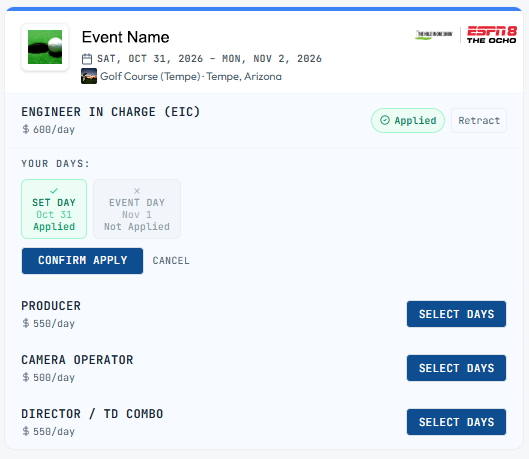
- Select the position for which you with to apply, and click "Select Days".
- Select the day(s) for which you wish to apply.
- ✅ Dates you are applying for.
- ❌ Dates you are not applying for.
- Click Confirm Apply
- Requests (Events for which you have been specifically requested.)
- Log into the CrewAngle Crew Portal
- Click Requests You will be presented with a list of "cards" showing positions for which you have been specifically requested by the crewer.
- Under each position , you may select Apply or Decline.
- To confirm your application has been submitted, click Assignments, and the Event will display one of the following:
- Awaiting Admin Confirmation, if not yet confirmed.
- View Call Sheet, if confirmed.
- Declined.